
I’ve released vivo-HighRefresh-NoRoot, a tool that locks the refresh rate on vivo phones at 144Hz or higher without root.
144Hz Lock Without Root
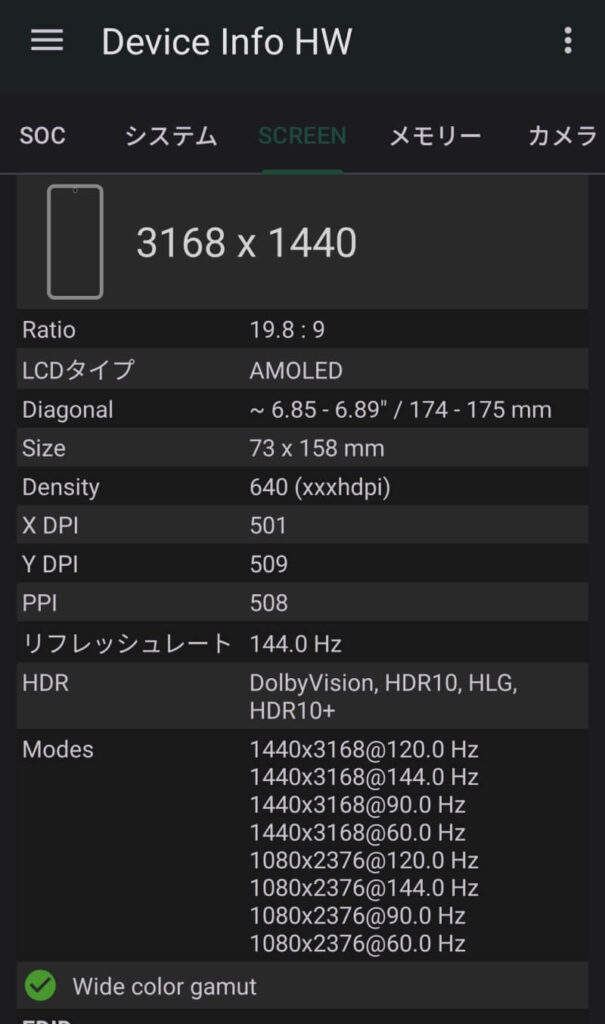
vivo-HighRefresh-NoRoot locks the display refresh rate at 144Hz or higher on vivo phones such as the iQOO 15 Ultra.
No root, no Magisk, and no bootloader unlock required.
I also confirmed that a 165Hz lock works on the iQOO Pad Ultra.
Using vivo’s Own rms Service
vivo’s system manages the display refresh rate through its own service called rms.
Android’s standard service call command can’t send requests to this service in the correct format.
So this tool runs a small program, RmsVote.dex, on the phone via adb. It sends requests in the same format vivo’s system itself uses.
Because the request is treated as coming from the system itself, the refresh rate setting is accepted even without root access.
144Hz and above is a special mode vivo reserves for certain games, so the tool also sends the flag needed to enable that mode.
Requirements and Preparation
You need a PC with adb, plus either the Windows Command Prompt or a bash environment.
For bash, use WSL or Git Bash on Windows. On Mac or Linux, run it straight from the terminal.
You can also run it from Termux on an Android device via wireless debugging.
On the phone, enable Developer options and turn on USB debugging or wireless debugging.
Prebuilt files are included, so you can download them from GitHub and use the tool without building it yourself.
How to Use and Revert
(For bash, replace .\vivo-rms.cmd with ./vivo-rms.sh)
First, run .\vivo-rms.cmd modes to check which refresh rates your panel supports.
If 144 is listed, .\vivo-rms.cmd set 144 locks it at 144Hz.
Check the current rate with .\vivo-rms.cmd get. At 144Hz it shows “rate=144.0”.
The lock stays in place until you release it or reboot.
To revert, run .\vivo-rms.cmd release 0 900001.
App Settings Take Priority
Some apps set the display refresh rate themselves.
While those apps are on screen, their setting takes priority and the display may not run at 144Hz.
Run .\vivo-rms.cmd reason to see which request is being applied.
“RmsVote|144” means this tool’s setting is active. Output starting with “reqFps:” means the app’s setting is being used.
Summary
With vivo-HighRefresh-NoRoot, you can lock vivo phones like the iQOO 15 Ultra at 144Hz without root.
Setup takes just a few adb commands, and reverting is just as easy.
If you want smoother scrolling and gaming, give it a try at your own risk.